
Spreadsheets
Spreadsheets display information in a grid-like format of rows and columns. They organize information in a way that’s easy to scan so that users can look for patterns and insights.
Section titled “ Design”
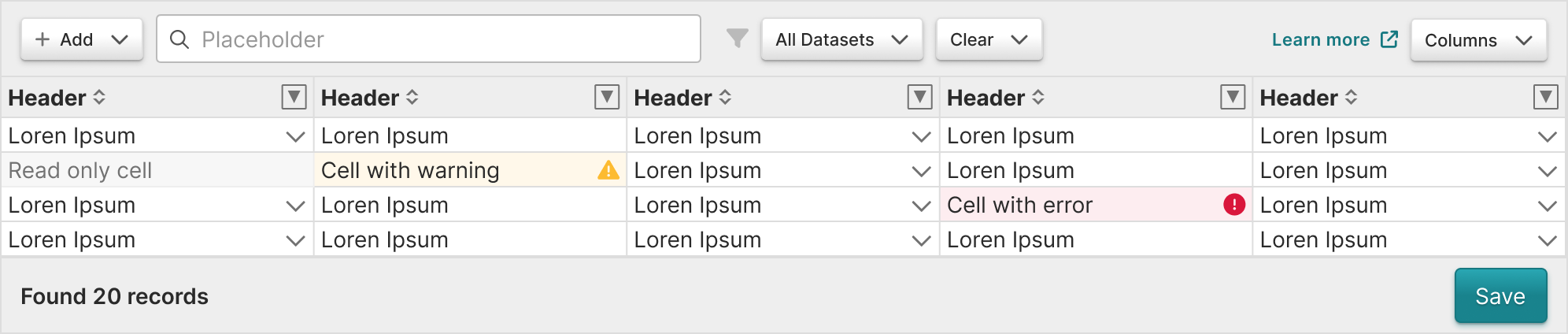
This static image represents the component’s style. Due to the complexity of the code, the Product Design Team is unable to build this component in the design system. Ask a dev lead for more documentation on this component.
In Practice
Section titled “ In Practice”Concepts
Section titled “Concepts”- Can be controlled by the engineer, but augmented by user preference depending upon the features you enable.
- The toolbar offers the user ways to manipulate the display and order of the data.
Content guidelines
Section titled “ Content guidelines”Headers should:
- Be informative and descriptive
- Be concise and scannable
- Include units of measurement so they aren’t repeated throughout the columns
- Use sentence case (first word capitalized, rest lowercase)
Column content should:
- Be concise and scannable
- Not include units of measurement (put those in the headers)
- Use sentence case (first word capitalized, rest lowercase)
Accessibility
Section titled “ Accessibility”Keyboard support
Section titled “Keyboard support”Sorting controls for spreadsheets are implemented with the library.
Design resources
Section titled “ Design resources”When designing tables in Certara’s Design Library, use plugin Table Creator